
OpenAI DevDay 2026: Every Major Announcement, Explained
A complete map of OpenAI DevDay 2026: Dots, GPT-6.1 Sol, Codex Cloud, Agents API, Plugins, Space, Pages, Pro 500, and the platform strategy connecting them.
OpenAI DevDay 2026, held on September 29, was not mainly a model launch. Its more than 20 announcements connect into an operating stack: persistent agents receive work, models reason, Codex and APIs execute, plugins connect outside software, Space and Pages hold artifacts, and identity and marketplace products distribute access.
The distinction between announced and available is essential. Availability can depend on a plan, administrator, region, client, rollout, or contract. This recap uses current OpenAI product documentation and reflects status checked on October 13, 2026—not just keynote wording.
Why the Count Is 25, Not 21
OpenAI's official language is deliberately broad: “more than 20 major announcements.” If each separately titled item in the recap is counted once, the total is 25. Other recaps reach different numbers by splitting features, counting demonstrations, or combining closely related releases. This article uses the official page as the boundary and treats its 25 headings as the release list.
The count matters less than the structure. DevDay 2026 was not a bag of unrelated updates. The releases form five connected layers: persistent agents, models and privacy, developer execution, plugin distribution, and collaborative work. Seen that way, the day was OpenAI's clearest attempt yet to become the place where AI work starts, runs, gets reviewed, and reaches other people. The official recap is the source of record for this grouping and for launch-day eligibility.
1. Persistent Work: Dots, GPT-6.1 Sol, Ultrafast, and Private Intelligence
Dots were the center of the keynote: persistent agents that can continue work between conversations. OpenAI's current Dots documentation says rollout is gradual and lists plan, age, region, and administrator conditions; eligibility does not guarantee immediate access.
GPT-6.1 Sol supplies the lower-cost model layer. Its official model card lists a 1.05-million-token context window, supported tools, and current API pricing, and describes performance as near Astra rather than publishing a universal replacement claim. Our separate GPT-6.1 Sol analysis examines the positioning and its limits.
Ultrafast is a premium processing tier rather than a new model. The Ultrafast guide documents separate rate limits and higher pricing; the API changelog records GPT-6.1 Sol Ultrafast reaching the Responses API on October 8. Actual latency gains depend on the workload and connection, so the article does not treat keynote speed figures as a guaranteed throughput rate.
Private Intelligence addresses the enterprise trust layer. OpenAI's Private Safety Processing guide describes automated safety review in a hardware-attested runtime, customer-controlled storage, and bounded signals leaving the protected review. It also spells out eligibility, storage, key, and retention responsibilities; this is not a blanket promise that every OpenAI workload is private or zero-retention.
2. Codex Becomes a Cloud Development Environment
Codex in the cloud allows development tasks to continue with the laptop closed and be accessed from web, mobile, or desktop. The cloud environments guide documents reusable repository, dependency, tool, and access setups, with each new task receiving an isolated workspace.
The Codex CLI remains the local terminal control surface. Its current command reference is the source of truth for stable, beta, and experimental commands, including cloud, resume, review, sandbox, and plugin operations; capabilities should be checked there rather than inferred from a keynote demo.
Code Review can review uncommitted work, a base-branch diff, or a commit. The developer command reference documents both interactive /review and non-interactive codex review, including mutually exclusive review targets.
Codex Security Cloud scans connected GitHub repositories in Codex cloud and lets users review findings and proposed patches. The current Security Cloud setup guide describes it as a separate plugin and tells users to confirm workspace access; it should not be presented as universally available.
Taken together, these are not four convenience features. They turn Codex from a terminal assistant into a hosted development environment with reusable infrastructure, parallel workers, review, and security operations. The open-source runtime behind the product remains a separate question, covered in our Codex Harness analysis.
3. The Agent Platform: Decisions API, Computer Use, and AWS
Decisions API focuses Luna on questions with a finite set of allowed answers. Applications can feed it text or images and receive a probability, fixed-set choice, score, or next-action decision. It launched in limited preview, then entered public beta on October 6. OpenAI’s current Decisions documentation says gpt-6-luna is the only supported model and GA is expected later; public beta is not GA.
Agents API with Computer Use adds durable sessions around an OpenAI-managed Codex harness. The Agents API overview separates the agent, environment, session, and events, while the Computer Use guide documents an OpenAI-hosted browser and explicit website-access and sign-in handling.
Bedrock Managed Agents, powered by OpenAI adapts the agent and session concepts for AWS. OpenAI's comparison guide makes the boundary explicit: Amazon Bedrock hosts the harness and inference, while AgentCore Runtime or self-hosted compute runs commands and tools.
The three products occupy different layers: Decisions API makes narrow choices, Agents API runs open-ended work, and Bedrock packages agent execution for AWS. Combining them under one “agent API” label would hide the actual architecture.
4. Plugins Turn ChatGPT Into an Application Platform
Plugin Extensions let developers add sidebar apps, conversation panels, composer mentions, settings, and file viewers to supported ChatGPT surfaces. The official extensions reference also marks surface-specific limitations and coming-soon availability.
Plugin packaging and discovery now use a shared public directory across supported ChatGPT and Codex surfaces; the packaging guide distinguishes that directory from local or repository marketplaces. Sites can use plugins with each viewer's own connected permissions, as documented in the Sites guide. MCP Events let ChatGPT subscribe to supported service events through webhooks; the MCP Events specification documents supported surfaces, lifecycle methods, and current protocol constraints.
These four releases are best read as one platform move: build, render, trigger, review, and distribute third-party software inside ChatGPT. The mechanics and security implications deserve their own treatment, so our OpenAI Plugins guide covers them without repeating the entire DevDay catalog.
5. Shared Work: Space, Pages, Teams, and Meetings
ChatGPT Space brings pages, files, and shared work together. The current Space guide explains spaces, page sharing, connected sources, and permission inheritance without assuming every account has identical availability.
Pages are editable documents for notes, plans, research, generated media, and visualizations. The Pages guide documents direct editing, comments, subpages, file references, prompts, and Agent instructions. Slides should be treated according to the current product UI and documentation, not a keynote delivery estimate.
Teams and Team Tasks can run scheduled or supported event-triggered work with a team service account and configured connections. The team administration guide documents the required permissions and makes clear that tasks do not inherit a creator's personal memory or chat history. The separate Slack and Teams guide explains the service-account and workspace-connection boundary.
The Meetings plugin can create meeting notes and action items for ChatGPT Space. Because access and platform support can change, readers should verify the current plugin listing and workspace settings rather than rely on launch-day platform claims.
This collaboration layer is the connective tissue of the event. Dots need durable context; agents need somewhere to leave artifacts; teams need to review and refine recurring work. Space, Pages, Team Tasks, chat integrations, and meeting notes provide that shared state.
6. Distribution, Identity, Subscription, and Procurement
Sign in with ChatGPT is an identity connection and, for supported partners, a separate permission to use eligible ChatGPT plan usage. The current partner and permission guide lists participating apps and stresses that signing in and using plan allowance are distinct grants.
Pro 500 is one of the current Pro subscription levels and includes Ultrafast access. OpenAI's pricing page is the correct source for current price, plan inclusions, usage rules, and regional or workspace conditions; API token pricing is separate.
The keynote also described broader enterprise distribution and procurement. Because those arrangements are account- and contract-specific and are not fully documented in the public product guides used here, this article does not turn launch-day partner counts or procurement terms into a current availability promise.
Availability at a Glance
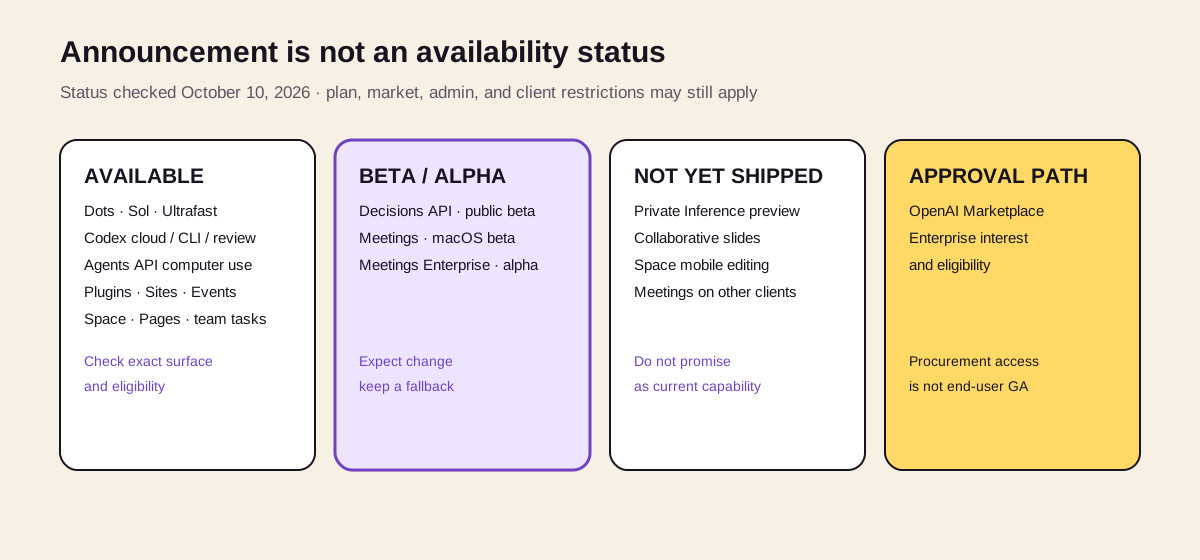
Status is attached to each product surface, not to the event as a whole. “Available” can still require a paid plan, administrator setting, supported market, or specific client.
| Status checked October 13 | Announcements |
|---|---|
| Documented as available on supported surfaces, subject to plan, market, admin, or platform | Dots, GPT-6.1 Sol, Ultrafast, Codex Cloud, Codex CLI, Code Review, Codex Security Cloud, Agents API with Computer Use, Bedrock Managed Agents, Plugin Extensions, Sites plugins, MCP Events, Space, Pages, Team Tasks, Slack/Teams integration, Sign in with ChatGPT, Pro 500 |
| Beta | Decisions API public beta; other product surfaces may separately carry beta or preview labels in their current documentation |
“Available” does not mean every user sees every feature. Plans, regions, workspace administrator settings, client platforms, and staged rollouts still apply.
What Changes for Users
The user-facing shift is from isolated chats to durable work. Dots can own ongoing responsibilities; Space holds shared project context; Pages preserve work products; plugins and connected tools bring outside systems into the same surface. Team tasks and MCP Events add schedules and event triggers, so a user no longer has to initiate every run with a fresh prompt.
That convenience increases the importance of scope. Before enabling a persistent agent or plugin, users should be able to answer which workspace can see it, which connected account it uses, whether an action is a draft or a commit, and where the result will remain. A task running “while you are away” still needs an owner, a stop path, and a review point.
DevDay also did not make every surface universal. Standard Chat availability differs from ChatGPT Work and Codex; Dots have plan, market, rollout, and administrator conditions; plugins and shared work depend on workspace settings. Product names cannot substitute for checking the current account.
What Changes for Developers
For developers, the stack reduces how much orchestration must be built from scratch. Agents API adds hosted computer use, multi-agent work, tool search, tool calling, and context compaction. Plugins add UI surfaces and distribution inside ChatGPT. MCP Events add external triggers. Sign in with ChatGPT can provide identity and, for participating partners, controlled plan usage.
The trade-off is that product boundaries now matter to architecture. A developer must distinguish API availability from Codex or ChatGPT availability; a public beta from GA; an MCP proposal from a stable dependency; and a plugin permission from the underlying service’s resource permissions.
The practical question is not “which DevDay feature can we add?” It is which layer the application genuinely needs. A fixed classification may fit Decisions API. An open-ended interface workflow may need Agents API with Computer Use. A collaborative ChatGPT experience may need a plugin or Site. Combining every layer creates more identity, data, approval, and failure boundaries than most first versions require.
What DevDay Did Not Resolve
The new stack is coherent, but it is also harder to understand. Plugins, skills, connectors, MCP, Computer Use, Sites, Space, Pages, tasks, and Dots overlap in everyday language even when their technical roles differ. OpenAI now has to make those boundaries understandable to users who do not think in platform diagrams.
Permissions also become more consequential. An always-on agent with connected apps, event triggers, a cloud computer, shared workspace context, and third-party plugins can do useful work precisely because it has broad reach. The same reach increases the cost of a mistaken instruction, malicious document, overbroad grant, or compromised integration.
Finally, the most capable experiences sit behind expensive plans or enterprise controls. OpenAI is widening access to intelligence with GPT-6.1 Sol while charging a premium for speed, high allowances, persistent agents, and governed collaboration. That tension is part of the product strategy, not an accidental launch detail.
A Five-Question Adoption Check
Before choosing a feature from the announcement list, verify:
- Current state: Is it GA, beta, alpha, preview, coming soon, or merely an announced direction?
- Exact surface: Does it exist in the API, Codex, ChatGPT Work, ordinary Chat, a desktop client, or an AWS environment?
- Eligibility: Which plan, region, platform, workspace setting, and administrator approval are required?
- Control boundary: Which identity, files, plugins, connected tools, and actions can the feature reach, and where does human approval occur?
- Exit and fallback: What happens when the preview changes, allowance runs out, a plugin is removed, or the hosted environment is unavailable?
Use a small reversible workflow for beta products and keep a fallback for core operations. Announcements are useful for planning; only current product documentation should drive a production promise.
The Real DevDay Announcement Was the Stack
DevDay 2026 showed OpenAI moving beyond the model-and-chat era. Dots are the workers. GPT-6.1 Sol is the lower-cost reasoning layer. Codex and Agents API execute. Plugins bring third-party applications and events into the environment. Space and Pages retain shared context and artifacts. Sign in with ChatGPT adds an identity and, for supported partners, plan-usage layer.
No single announcement completes that vision, and several pieces remain previews or staged rollouts. But the direction is clear: OpenAI wants to own the operating surface where people assign work, agents execute it, teams review it, and software reaches users.
The release list follows OpenAI’s official DevDay recap. Post-event state changes were checked against OpenAI developer and Help Center documentation on October 13, 2026.
Related posts

What Is ChatGPT Space? Pages, Projects, and Permissions
ChatGPT Space organizes editable Pages, files, and collaboration. Learn how it differs from Projects and chat, how permissions work, and…
Raycast for Windows Is Here: Raycast or Floatboat?
Raycast now runs on Windows. Compare Raycast and Floatboat by search, extensions, AI agents, files, projects, automation, pricing, and the…
Gemini 3.7 Flash: Model ID, Pricing, Specs, and 3.8 Migration
Gemini 3.7 Flash guide covering the exact model ID, 1M context, multimodal tools, time-bound pricing, migration parameters, and when 3.8 is…
https://floatboat.ai/blog/openai-devday-2026-announcements