Introducing Floatboat Flow Mode — AI Voice Dictation
Floatboat Flow Mode turns speech into living documents—edit while you dictate, batch voice annotations for your Agent, and get meeting action items before the call ends.
TL;DR
-
Floatboat Flow Mode is a voice-first writing layer inside Floatboat where speech, manual edits, and Agent collaboration happen in the same document —without stopping your train of thought.
-
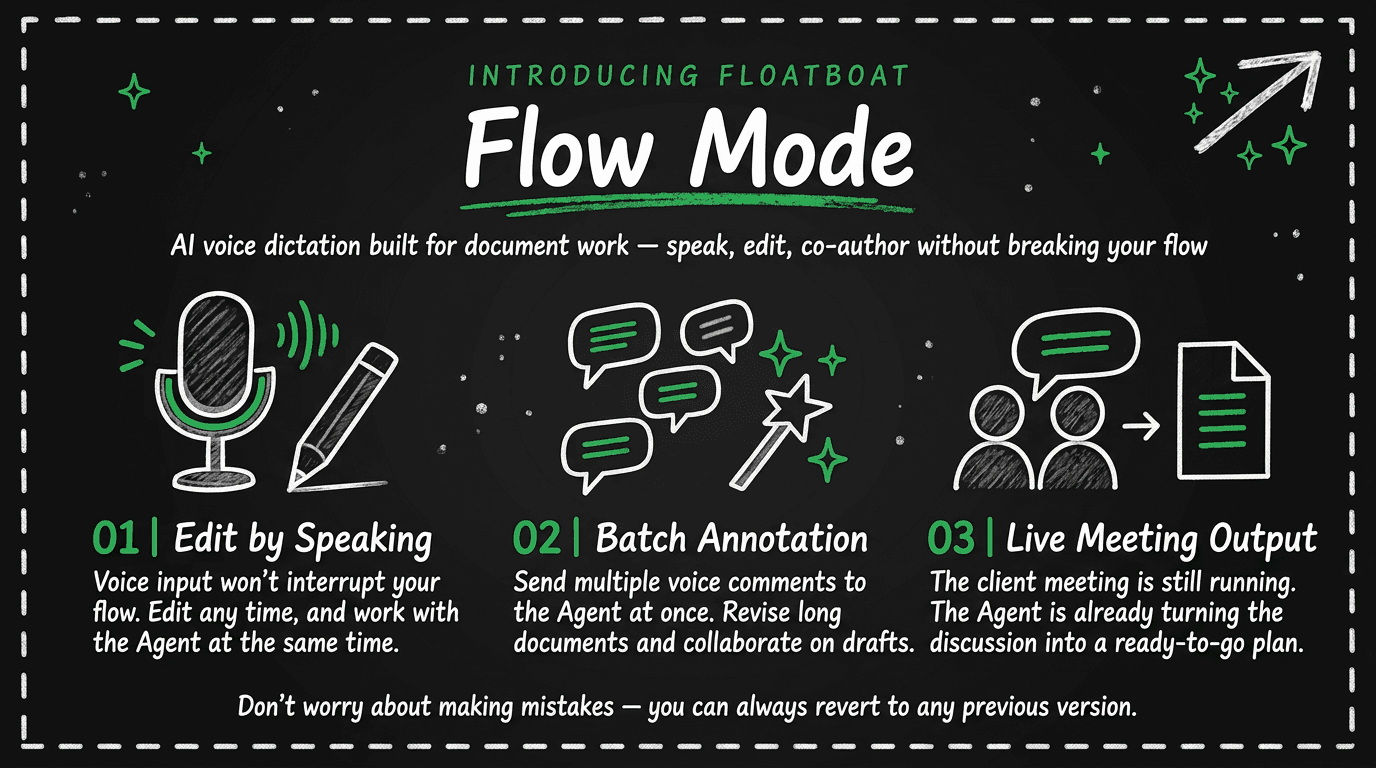
Edit while you speak : real-time AI voice dictation keeps flowing into the draft while you select a sentence and ask the Agent to refine it in place.
-
Batch annotations : circle several spots in a long doc, describe each change by voice, and hand the whole bundle to the Agent in one pass.
-
Live meeting output : while a conversation is still running, discussion lines up as notes and can become a checklist with owners—before anyone opens a separate AI meeting notes tool after the call.
-
Version history with diff : every voice and Agent edit is tracked; compare versions and roll back safely when you experiment.
Floatboat Flow Mode is AI voice dictation built for document work: you stay in the draft, the Agent stays beside you, and the calendar-driven workspace around it still handles prep, deadlines, and follow-up.
1. Flow Mode is live: expression without waiting on tools
If you write for a living—as a solo founder drafting a launch post, a consultant shaping a client proposal, or an operator turning meeting talk into a plan—you already know the friction. Speech-to-text gets words onto the page faster than typing, but most tools treat dictation as a separate mode: stop talking, fix the paragraph, copy a chunk into chat, paste the rewrite back, repeat. AI meeting notes apps capture calls well, yet the deliverable often arrives after the meeting, in another tab, disconnected from the doc you were trying to finish.
Floatboat Flow Mode is our answer to that split. It is not a standalone dictation utility and not a post-meeting summarizer bolted onto the side. It is an expression layer inside Floatboat where voice input, editing, Agent rewrites, meeting capture, and version control share one surface—the document you are actually trying to ship.
The goal is simple and hard at the same time: keep your flow. You talk; the draft grows. You touch the keyboard when you want precision. The Agent works on the span you select, not on a detached chat thread. When the meeting is still going, the outline of next steps can already be on the table.
2. The problem: tools interrupt the sentence, not the other way around
Most writing stacks assume you will switch contexts to get help. Dictation apps— including strong system-wide tools such as Wispr Flow—excel at turning speech into clean text wherever your cursor lives. That is genuinely useful for email, Slack, and quick fields. What they typically do not optimize for is long-form co-authoring : a draft that evolves over twenty minutes of speech, mid-stream edits, and several Agent passes on different paragraphs in one file.
Meeting AI has a parallel gap. Mature AI note takers like Otter and Fireflies are excellent at transcription, search, and post-call summaries. They are built around the recording lifecycle , not around a working document that must be ready during the conversation. If your job is to leave the call with an action list stakeholders can react to—not a transcript to process later—the center of gravity is still wrong.
Chat-based writing assistants add a third interruption. Paste a section into Claude or ChatGPT, get a rewrite, paste back. The intelligence is real; the document is not the runtime. For solopreneurs who already juggle calendar prep, client calls, and shipping copy, that extra loop is where momentum dies.
We built Flow Mode around a different center: the document is the workspace , voice is the primary input, and the Agent is a collaborator inside the same file—aligned with Floatboat's broader Calendar-Driven story that work is triggered by what is on your schedule, not by whichever chat window you remembered to open. For the paradigm contrast in depth, see Calendar-Driven AI vs Chat-Based AI.
3. What Floatboat Flow Mode does (in plain terms)
Flow Mode ships as four capabilities that mirror how people actually write and meet. You can use them independently; together they cover the path from first spoken draft to safe revision.
3.1 Edit while you speak
Traditional voice typing often locks you into a record-then-fix rhythm: finish the take, then edit. Flow Mode keeps real-time transcription running into the document while you remain free to change words directly. When a sentence is close but not quite right, select it and hand that span to the Agent—without stopping the broader dictation session.
In practice that looks like a long thought landing in the doc as you talk, a quick manual tweak to a phrase, then a targeted Agent rewrite on the line that needs polish. The Agent panel reflects the shift from passive capture to active collaboration; the rest of the paragraph stays yours. If you have used selection-based voice editing in tools like Aqua Voice's Edit Mode, the interaction will feel familiar—but here it is native to a persistent Agent workspace , not a cross-app keyboard layer alone.
This is the core AI voice dictation difference we care about: dictation is not an endpoint; it is the continuous feed into a document you and the Agent co-own.
3.2 Batch annotations for long documents
Short prompts work until they do not. A brand story, a policy draft, or a multi-section proposal often needs many small edits —tighten tone on line four, swap a vague adjective on line twelve, add a number on line eighteen. Describing each fix in serial chat is tedious; marking up a PDF and hoping someone applies it is worse.
Flow Mode lets you select a phrase , describe the change by voice, and park that note in a bundle while recording continues. Voice notes land in a buffer first; you choose when to insert them so you never lose a half-formed instruction mid-sentence. When the bundle is ready—three locations, three intents—you send the package to the Agent once. Each chip keeps its line anchor , so rewrites land where you meant, not where the model guessed.
For anyone who edits long markdown or briefs inside Floatboat, this is the difference between "talk to chat about the doc" and "talk to the doc with structured intent."
3.3 Live meeting output—not just post-call notes
Flow Mode's meeting view records who said what as the conversation unfolds—speaker by speaker, line by line. That alone saves scramble time; the deeper move is editing earlier lines while the meeting continues. Someone revises an action wording; you update the live line without breaking capture.
When the discussion has moved forward enough, you push the latest context to the Agent. The output is not a wall of transcript—it is a working plan : a title, checkable items, and owners attached. The meeting can still be running when the draft plan appears. That complements Floatboat's existing AI meeting preparation pipeline (context before the call) and AI follow-up automation (structured next steps after)—Flow Mode fills the during gap that note-takers rarely optimize for.
We are not claiming to replace dedicated conferencing bots for every team; Otter and similar tools still win on ecosystem breadth and meeting search. Flow Mode is for operators who want deliverables in the doc , not only a searchable recording elsewhere.
3.4 Version history when you experiment boldly
Voice and Agent edits make drafts move fast—which is the point—and fast movement makes people hesitate unless rollback is obvious. Flow Mode records version history with human-readable labels and timestamps. Open an earlier revision, see diff against the current text, and revert in one action if an Agent pass overshot.
That safety net matters for solo founders who draft in public: you can try an aggressive rewrite on the opening paragraph, compare, and step back without archaeology in "undo" or orphaned chat threads.
4. Where Flow Mode sits in the Floatboat workspace
Floatboat remains the proactive Agent OS that runs work from the calendar —agents prep before meetings, execute on deadlines, and follow up after. Flow Mode does not replace that engine; it strengthens the expression surface where many of those outputs land.
Think of a typical client day: the calendar triggers a pre-meeting brief (prep pipeline); you join the call and capture decisions with Flow Mode's live plan; after the slot, follow-up drafts and tasks flow through the existing automation story (follow-up pipeline). Voice gets you through the memo; batch annotations clean the long doc; versions keep experiments reversible.
If you keep research in Obsidian or local markdown, Flow Mode also pairs naturally with the workflow in how to use Obsidian with an AI agent—speak a draft, refine in place, and keep context in files you control rather than in a disposable chat session.
Flow Mode is desktop workspace functionality inside Floatboat on Mac and Windows—the same environment where Combo Skills, multi-model routing, and event-scoped Agent workspaces already live. Exact availability may vary by release; the live app and release notes always supersede this post.
5. A quick scenario: from spoken draft to signed-off plan
Picture a product launch week. Monday morning you open a launch memo and turn on Flow Mode. For fifteen minutes you talk through positioning—no outline required upfront—and the sections appear as you speak. You select the headline sentence and ask the Agent for a sharper hook; only that span changes.
Tuesday you run a brand review on a longer story. You highlight three awkward phrases, dictate three fixes into the annotation bundle without stopping the room's discussion recording, insert each note, and send the batch to the Agent once. Wednesday's client workshop is captured line by line; mid-call you revise one action item wording; before hang-up you generate a checklist with owners. Thursday you compare today's intro against Monday's version, keep the better hook, and revert a paragraph that drifted too casual.
At no point did you export the doc to a chat box or wait until Friday to "process the recording." That is the workflow Flow Mode is designed for.
Conclusion
Floatboat Flow Mode treats AI voice dictation as the start of co-authoring—not a shortcut to raw transcript. If your bottleneck is switching between speaking, typing, chatting, and meeting tools, the fix is not louder prompts; it is a single document stream that respects momentum.
Try Flow Mode in the latest Floatboat build on floatboat.ai. If you are comparing paradigms first, read Calendar-Driven AI vs Chat-Based AI; if your week is meeting-heavy, pair this launch with the meeting prep and follow-up guides already on the blog.
Frequently Asked Questions
Is Floatboat Flow Mode the same as speech-to-text or a meeting bot?
How is Flow Mode different from system-wide dictation apps like Wispr Flow?
Can I edit while dictation is still running?
Does Flow Mode replace Floatboat's calendar-driven meeting prep and follow-up?
What if an Agent edit goes wrong?
Where does Flow Mode run, and is it available everywhere?
https://floatboat.ai/blog/introducing-flow-mode